Time Budget Blocks
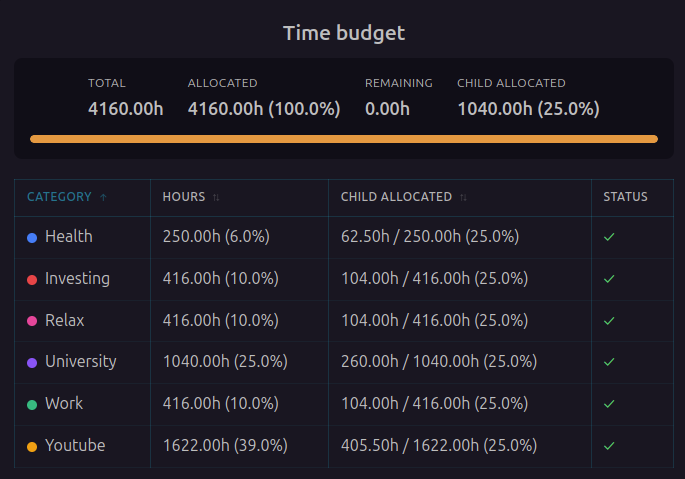
Time budget blocks are interactive visualizations that display time allocation statistics directly in your periodic notes.
Overview
The plugin automatically adds time budget blocks to generated periodic notes. These blocks render as interactive visualizations showing:
- Pie chart of category distribution
- Detailed allocation table
- Budget status indicators
- Edit button for quick adjustments
How It Works
When the plugin generates a periodic note, it automatically inserts a periodic-planner code block:
```periodic-planner
work: 8h
health: 2h
learning: 1h
```
This code block renders as an interactive time budget interface. You don't need to create these manually — the plugin handles it automatically.
Editing Allocations
To allocate time to your categories:
- Open a periodic note (daily, weekly, monthly, etc.)
- Click the Edit allocations button
- Use the allocation editor to distribute hours across categories
- Click Save to update the note
The allocation editor provides multiple ways to set values.
Learn more about the Allocation Editor
Configuration
Customize how time budget blocks are inserted:
- Go to Settings → Periodix-Planner → Generation
- Configure block insertion options:
- Add heading above code block - Include markdown heading
- Plan heading content - Customize heading text
The plugin automatically adds blocks to all generated periodic notes based on these settings.
Related: Learn about Time Budgeting and Allocation Editor.