Note Interconnection
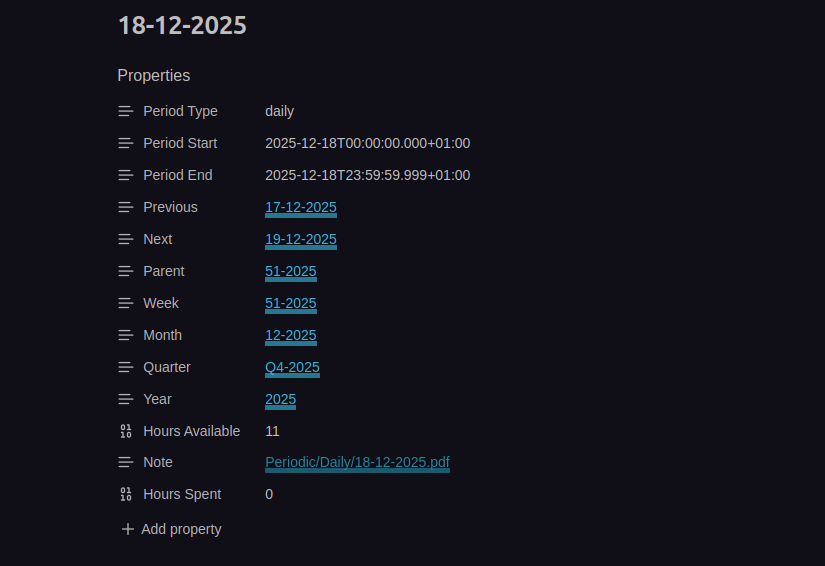
All periodic notes in Periodix-Planner are intelligently linked through frontmatter properties, creating a navigable web of time that lets you zoom in and out of your planning horizon effortlessly.
Link Structure
Each periodic note contains links to:
- Previous period - Same type, earlier in time
- Next period - Same type, later in time
- Parent period - The period that contains this one
- Ancestor periods - All periods above in the hierarchy
Hierarchy
Year (2025)
├── Quarter (2025-Q1)
│   ├── Month (2025-01)
│   │   ├── Week (2025-W01)
│   │   │   ├── Day (2025-01-01)
│   │   │   ├── Day (2025-01-02)
│   │   │   └── ...
│   │   └── Week (2025-W02)
│   └── Month (2025-02)
└── Quarter (2025-Q2)
Frontmatter Properties
Daily Note Example
---
Previous: "[[2025-01-14]]"
Next: "[[2025-01-16]]"
Week: "[[2025-W03]]"
Month: "[[2025-01]]"
Quarter: "[[2025-Q1]]"
Year: "[[2025]]"
Hours Available: 24
---
Weekly Note Example
---
Previous: "[[2025-W02]]"
Next: "[[2025-W04]]"
Month: "[[2025-01]]"
Quarter: "[[2025-Q1]]"
Year: "[[2025]]"
Hours Available: 168
---
Monthly Note Example
---
Previous: "[[2024-12]]"
Next: "[[2025-02]]"
Quarter: "[[2025-Q1]]"
Year: "[[2025]]"
Hours Available: 730
---
Navigation
You can navigate between periods using frontmatter links or commands. Click any link in the frontmatter to jump to that period, or use keyboard shortcuts for quick navigation.
Automatic Updates
The plugin automatically updates links when notes are generated, maintains consistency across all notes, and creates missing links when needed.
Use Cases
Chronological Navigation: Move forward/backward through time (days, weeks, months, quarters, years).
Hierarchical Navigation: Zoom in and out between period levels (Daily → Weekly → Monthly → Quarterly → Yearly).
Context Switching: Quickly see what larger period a note belongs to (e.g., which week contains a specific day).
Related: Navigation Commands • Note Generation