Navigation Commands
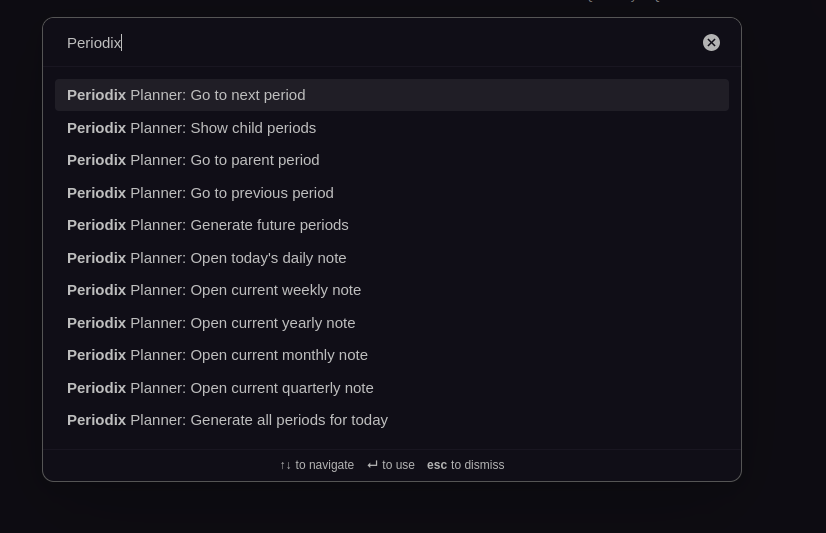
Periodix-Planner provides powerful commands for navigating between periodic notes quickly and efficiently.
🎯 Available Commands
Period Navigation
Go to Previous Period
- Command ID:
periodix-planner:go-to-previous - Description: Navigate to the previous period of the same type
- Usage: Works from any periodic note
- Behavior: Creates note if it doesn't exist
Go to Next Period
- Command ID:
periodix-planner:go-to-next - Description: Navigate to the next period of the same type
- Usage: Works from any periodic note
- Behavior: Creates note if it doesn't exist
Go to Parent Period
- Command ID:
periodix-planner:go-to-parent - Description: Navigate to the parent period
- Usage: Works from any periodic note (except yearly)
- Behavior: Creates note if it doesn't exist
Go to Child Period
- Command ID:
periodix-planner:go-to-child - Description: Navigate to a child period with smart interval detection
- Usage: Works from weekly, monthly, quarterly, or yearly notes that have child periods
- Behavior:
- If the current period contains today's date → navigates to the child period containing today
- If the current period is in the past or future → navigates to the first child period
- Only appears when child periods exist
Open Current Period
Open Today's Daily Note
- Command ID:
periodix-planner:open-daily - Description: Open or create today's daily note
- Usage: Works from anywhere
Open Current Weekly Note
- Command ID:
periodix-planner:open-weekly - Description: Open or create current week's note
- Usage: Works from anywhere
Open Current Monthly Note
- Command ID:
periodix-planner:open-monthly - Description: Open or create current month's note
- Usage: Works from anywhere
Open Current Quarterly Note
- Command ID:
periodix-planner:open-quarterly - Description: Open or create current quarter's note
- Usage: Works from anywhere
Open Current Yearly Note
- Command ID:
periodix-planner:open-yearly - Description: Open or create current year's note
- Usage: Works from anywhere
Generation Commands
Generate Future Periods
- Command ID:
periodix-planner:generate-periods-ahead - Description: Generate next periods for all types
- Usage: Works from anywhere, can be used manually if you disable auto-creation on startup
- Result: Creates next period notes
Child Periods
Show Child Periods
- Command ID:
periodix-planner:show-children - Description: Show all child periods for the current note
- Usage: Works from weekly, monthly, quarterly, or yearly notes
- Result: Opens modal showing child periods
⌨️ Using Commands
Command Palette
- Open Command Palette (Ctrl/Cmd + P)
- Type part of the command name
- Select the command
- Execute
🎯 Command Behavior
Context-Aware Commands
Some commands only work in specific contexts:
- Go to Previous/Next/Parent/Child: Only work from periodic notes
- Go to Child: Only works from non-daily notes with existing child periods
- Show Child Periods: Only works from non-daily notes
- Open Current Period: Works from anywhere
Note Creation
Commands automatically create notes if they don't exist:
- Navigation commands create target notes
- Open commands create current period notes
- Generation commands create all required notes
Related: Learn about Note Interconnection and Configuration.