Note Generation
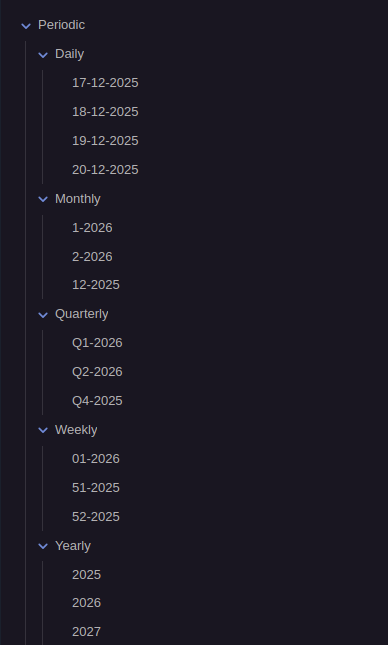
Periodix-Planner automatically generates periodic notes for all time periods, ensuring you always have the notes you need when you need them.
Overview
The plugin generates notes for:
- Daily notes - Generated for today and tomorrow
- Weekly notes - Generated for this week and next
- Monthly notes - Generated for this month and next
- Quarterly notes - Generated for this quarter and next
- Yearly notes - Generated for this year and next
Configuration
Go to Settings → Periodix-Planner → Generation tab:
| Setting | Description | Default |
|---|---|---|
| Auto-generate on load | Generate notes when Obsidian opens | true |
| Generate periods ahead | How many periods into the future to generate | 1 |
When enabled, the plugin automatically creates notes on Obsidian startup and generates the next period in advance.
Generated Note Structure
Each generated note includes:
Frontmatter Properties: Links to previous/next periods, parent period, and ancestor periods (week, month, quarter, year). Learn more about note interconnection
Time Budget Block: An empty periodic-planner code block is automatically added. Click "Edit allocations" to distribute hours across categories. Learn more about time budget blocks
File Organization
Notes are organized in configured folders (customize in Settings → Folders):
Periodic/
├── Daily/
│   ├── 2025-01-15.md
│   └── 2025-01-16.md
├── Weekly/
│   ├── 2025-W03.md
│   └── 2025-W04.md
├── Monthly/
│   ├── 2025-01.md
│   └── 2025-02.md
├── Quarterly/
│   ├── 2025-Q1.md
│   └── 2025-Q2.md
└── Yearly/
    └── 2025.md
Naming Formats
Customize note names in Settings → Naming using Luxon format tokens:
- Daily:
YYYY-MM-DD(e.g.,2025-01-15) - Weekly:
YYYY-[W]WW(e.g.,2025-W03) - Monthly:
YYYY-MM(e.g.,2025-01) - Quarterly:
YYYY-[Q]Q(e.g.,2025-Q1) - Yearly:
YYYY(e.g.,2025)
Generation Behavior
Existing notes:
- Never overwrites existing content
- Updates frontmatter if properties are missing
- Adds time budget block if missing
- Preserves all your content
Missing notes:
- Creates note with all required frontmatter
- Adds time budget block
- Creates folder structure if needed
Period generation: With "Generate periods ahead" set to 1, the plugin generates today + tomorrow (daily), this week + next week (weekly), and so on for all period types.
Related: Note Interconnection • Time Budget Blocks • Configuration