Category Management
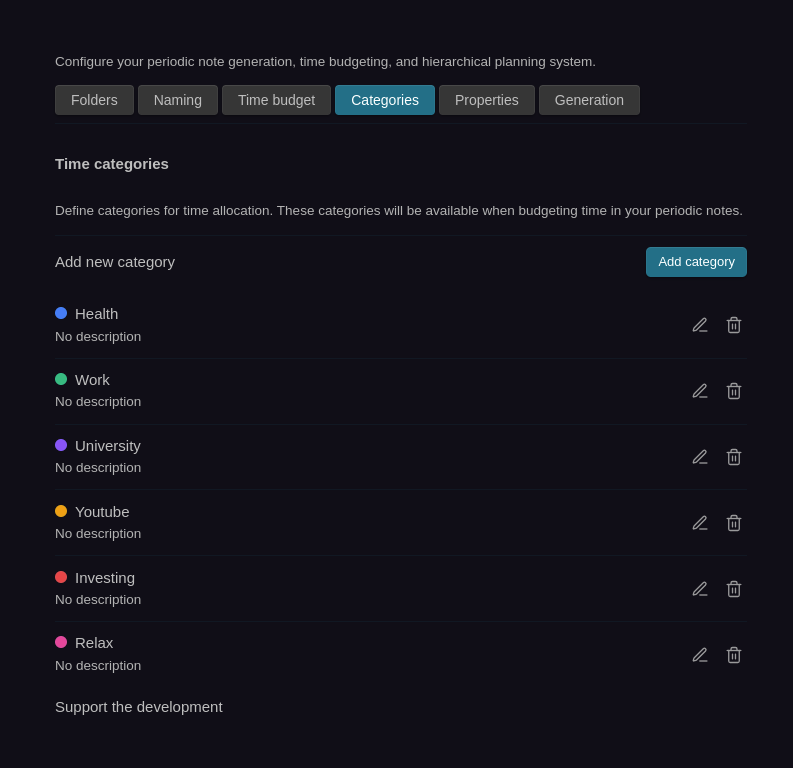
Categories in Periodix-Planner allow you to organize and track your time investments across different areas of your life.
🎯 Overview
Categories are the foundation of the time budgeting system. They represent different areas where you invest your time:
- Work - Professional activities
- Health - Exercise, wellness, self-care
- Learning - Education, skill development
- Relationships - Family, friends, social activities
- Personal Projects - Hobbies, creative pursuits
✨ Automatic Discovery
No manual category creation needed! Categories are automatically detected and registered when you use them in your periodic notes.
How It Works
- Write a Time Allocation: Add any category name in your time budget code fence
```periodic-planner
NewCategory: 5
``` - Instant Registration: CategoryTracker detects it and adds it to settings automatically with a default color
- Real-Time Tracking: Usage statistics update as you work across all notes
- Automatic Cleanup: Remove all instances of a category, and it's automatically removed from settings
Example
When you create a time budget in any periodic note:
```periodic-planner
Work: 40
Health: 10
Learning: 5
```
The categories "Work", "Health", and "Learning" automatically appear in Settings → Categories with default colors - no manual setup required!
Create Categories in the Allocation Editor
You can also create categories on-the-fly in the allocation editor:
- Open the allocation editor in any note
- Click "+ Create new category"
- Enter the category name
- Assign hours to it
- Save - the category is instantly registered with a default color
🎨 Using Categories
In Time Budgets
Categories work seamlessly across:
- Time Budget Blocks - Allocate hours in your periodic notes
- Allocation Editor - Interactive modal for managing allocations
- Statistics - Comprehensive analytics and visualizations
- Budget Tracking - Monitor spending across parent/child periods
🎨 Customizing Colors
Default Colors
When a category is first discovered, it's automatically assigned a color from the default palette:
- Blue (#3B82F6)
- Green (#10B981)
- Purple (#8B5CF6)
- Amber (#F59E0B)
- Red (#EF4444)
- Pink (#EC4899)
- Cyan (#06B6D4)
- Lime (#84CC16)
The system cycles through these colors as you add new categories.
Changing Colors
Personalize category colors in settings:
- Go to Settings → Periodix-Planner → Categories
- Find the category you want to customize
- Click the color picker next to the category name
- Choose a new color from the wheel or enter a hex code
- Changes apply instantly across all notes and visualizations
Visual Feedback: Category rows have a subtle background tint matching their color, and pie charts update immediately when colors change.
✏️ Editing Categories
Rename Categories
To rename a category across all your notes:
- Go to Settings → Periodix-Planner → Categories
- Click the pencil (edit) button next to the category
- Enter the new category name
- Click Rename
The system will automatically update the category name in all notes that use it.
Delete Categories
To completely remove a category:
- Go to Settings → Periodix-Planner → Categories
- Click the trash (delete) button next to the category
- Confirm the deletion in the dialog
- The category will be removed from all notes and settings
Note: Deletion is permanent and will remove the category from all time budget blocks across your vault.
📊 Category Statistics
The Categories settings tab serves as your analytics hub. See comprehensive usage data for all your categories:
What You'll See
For each category, view:
- Total Notes: How many notes use this category across all period types
- Period Breakdown: Usage per period type (e.g., "Daily: 5 · Weekly: 3 · Monthly: 1")
- Hours Allocated: Total time for the selected period type
- Percentage: Category's share of total time
- Color-Coded Rows: Visual identification with subtle background tinting
Smart Sorting
Categories are automatically ordered:
- By Hours (for selected period type): Most-used categories first
- By Total Notes: Categories in more notes rank higher
- Alphabetically: Ties broken alphabetically
Learn More: See the Statistics page for complete details on analytics, pie charts, and insights.
🔄 Category Lifecycle
Fully Reactive System
Categories automatically sync as you work - no manual management needed:
- Auto-Registration: Use a new category name → CategoryTracker adds it to settings with a default color
- Real-Time Tracking: See note counts and hours update instantly
- Color Changes: Update colors → all charts and UI reflect immediately
- Auto-Cleanup: Remove all allocations → category automatically removed from settings
- Undo/Redo Support: Create categories in the allocation editor with full undo/redo functionality
Behind the Scenes
The Plugin:
- Monitors all periodic notes for category usage
- Automatically registers new categories when detected
- Updates usage statistics in real-time
- Removes categories when no longer used
- Provides color management with automatic defaults
🔍 Finding Category Usage
In Settings
The Categories tab shows comprehensive statistics:
- Which notes use each category
- How many notes per period type
- Total hours and percentages
- Interactive pie chart visualization
- Edit and delete buttons for category management
In Notes
Categories appear wherever you allocate time:
- Time budget code blocks
- Allocation editor modal
- Parent/child budget tracking
🚫 Removing Categories
To remove a category from your system:
- Go to Settings → Periodix-Planner → Categories
- Click the trash (delete) button next to the category
- Confirm the deletion
- The category will be removed from all notes and settings automatically
Alternative: You can also manually remove allocations from all notes. Once a category is no longer used anywhere, it will be automatically cleaned up from settings.
Note: Category colors are preserved even if temporarily unused - they'll reappear with the same color if you use the category again.
Next Steps
- Statistics - Learn about comprehensive analytics and pie charts
- Time Budget Blocks - Understand how to allocate time in notes
- Allocation Editor - Use the interactive editor for time management
- Time Budgeting - Automatically inherit parent allocations