Notifications
Desktop alerts before events start with rich modal interface, flexible timing, per-event overrides, snooze functionality, and automatic duplicate prevention.
Basic Setup
Enable: Settings → Prisma Calendar → [Calendar] → Notifications (enabled by default)
Timed Events: Set default minutes before (0 = at start, 15 = 15 min before, 60 = 1 hour before)
All-Day Events: Set default days before (0 = day of event, 1 = day before, 7 = week before)
Per-Event Customization
Override defaults with Minutes Before (timed) or Days Before (all-day) in frontmatter:
Minutes Before: 30  # Timed event: notify 30 min before
Days Before: 3      # All-day: notify 3 days before
Disable for specific events by omitting the property, setting to empty, or using Already Notified: true.
How Notifications Work
System notification appears with event title and time. Modal opens showing timing info, event details, properties, and action buttons (Open Event, Snooze, Dismiss). Already Notified property is automatically set to true in frontmatter.
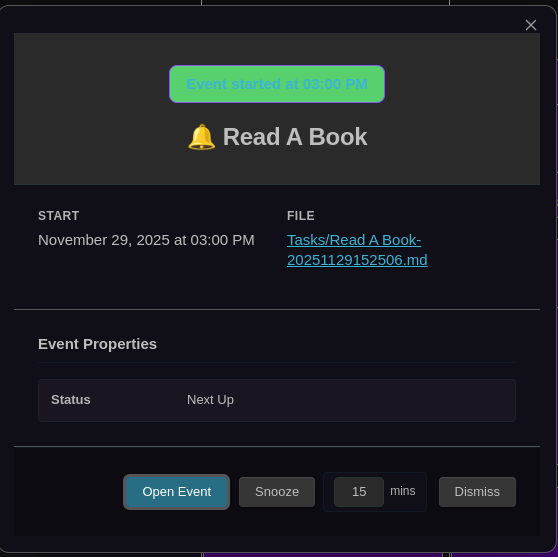
Rich notification modal with event details, snooze functionality, and quick actions
Snooze Functionality
Available: Timed events only (not all-day)
Postpones notification for configurable duration (default: 15 min, range: 1-120). Resets Already Notified to false, recalculates Minutes Before, and re-indexes file. Works for both future and past events with smart calculation.
Configure: Settings → Prisma Calendar → [Calendar] → Notifications → Snooze duration
Skip Newly Created Events
Default: Enabled
Automatically marks events as notified if they were created within the last minute, preventing notifications for events you just created via Create Event modal, Stopwatch, or other creation methods. The system detects newly created events by parsing the ZettelID timestamp embedded in the filename.
Toggle: Settings → Prisma Calendar → [Calendar] → Notifications → Skip newly created events
Use Case: Prevents unwanted notification spam when batch-creating events or using the Stopwatch to track work sessions.
For complete notification settings reference, see Configuration.
Frontmatter Properties
Minutes Before: 30        # Timed events (supports decimals)
Days Before: 1            # All-day events
Already Notified: false   # Auto-managed tracking
Related Features
- Event Previews - Rich hover and modal previews
- Filtering - Filter which events appear